Have you ever tried to find a picture online but could not get the result you wanted? Maybe you searched with words, but the image never appeared. Or perhaps you had a photo and wanted to know where it came from. This is where image search techniques become very useful.
Today, image search is much smarter than it was just a few years ago. Modern search engines do much more than match words with file names. They use artificial intelligence (AI), computer vision, and machine learning to understand what is actually inside a picture. They can recognize objects, colors, shapes, text, and even similar designs.
People use image search every day for many different reasons. Students use it for school projects. Journalists check if a photo is real. Online shoppers look for products using pictures instead of words. Website owners improve their SEO with better images. Photographers also use image search to protect their work.
In this guide, you will learn how image search works, the different types of image search, the best tools to use, and simple tips that professionals rely on every day. By the end, you will know how to find better images faster while avoiding common mistakes.
What Are Image Search Techniques?
Image search techniques are different ways of finding pictures online. Instead of only typing words into a search box, you can also upload a photo, search with your phone’s camera, or even search for one object inside a larger picture. These methods help you find better and more accurate results.
In the past, search engines mainly depended on file names and written descriptions. Today, things are much more advanced. AI studies the image itself and understands many visual details. This makes image search much more helpful than simple keyword matching.
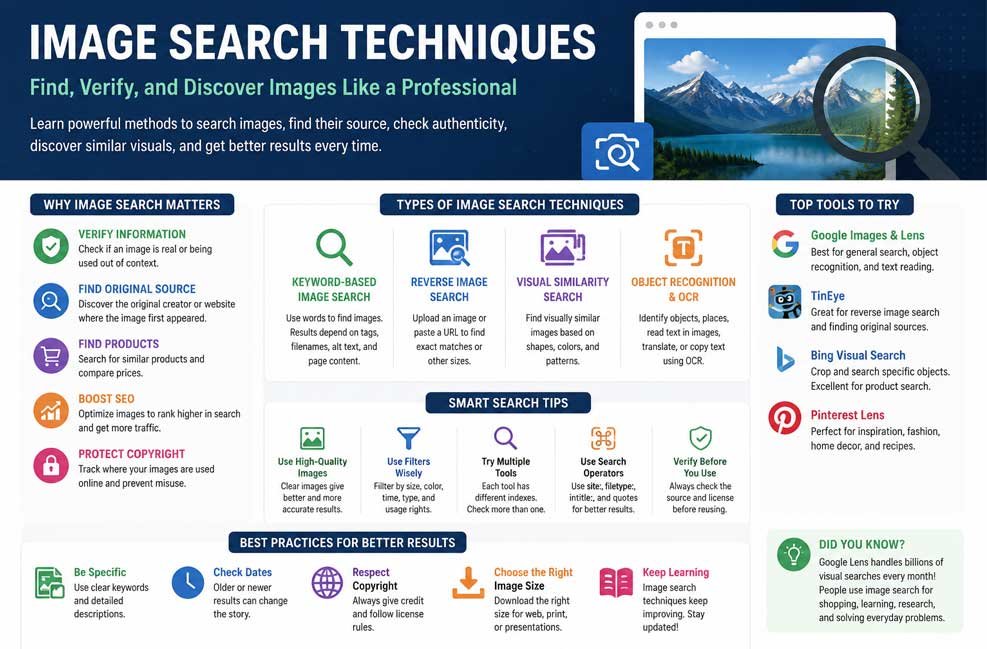
There are several types of image search techniques. Some use keywords, while others use reverse image search or visual search. Some tools even read text inside an image using Optical Character Recognition (OCR). Each method works best for a different purpose.
These techniques are useful in many situations. You can verify news photos, identify plants, compare products, discover travel places, find the original photographer, or search for similar designs. Learning when to use each method saves both time and effort.
How Image Search Works
Many people think image search simply looks at a file name, but that is only a small part of the process. Modern search engines study many different signals before showing results. This helps them understand what an image contains and how it relates to your search.
One important part is computer vision. This technology allows AI to recognize shapes, colors, textures, patterns, objects, and even faces in some situations. Instead of reading only words, the system understands what it actually sees inside the image.
Search engines also check metadata. This may include the file name, image title, EXIF information, captions, and alt text. Alt text is especially important because it describes the image for both search engines and people who use screen readers.
Another important signal is the surrounding content on a webpage. If an image appears beside an article about wildlife, travel, or technology, search engines use that nearby text to better understand the picture. Good context often improves search accuracy.
Finally, all these signals work together. Visual information, metadata, nearby text, and AI analysis help search engines decide which images best match your search. This combination makes modern image search much faster and more reliable than older systems.
Using Keyword Image Search
Keyword image search is the most familiar way to find pictures. You simply type words into a search engine like Google Images, and it shows pictures related to those words. This method is quick and works well for many everyday searches.
The quality of your keywords makes a big difference. A search for “car” may return millions of results. But a search for “red electric sports car 2026” is much more specific and usually gives better matches. Adding details helps the search engine understand exactly what you want.
You can also improve your searches by including colors, locations, dates, brands, sizes, or styles. For example, instead of searching for “coffee mug,” you could search for “blue ceramic coffee mug with lid.” Small details often produce much better results.
Quotation marks can also help when you want an exact phrase. Searching for “image search techniques” tells the search engine to keep those words together. This is useful when looking for guides, diagrams, or specific articles.
Keyword searches still depend heavily on good descriptions. Search engines often use file names, captions, alt text, and nearby content to decide which images to display. If an image has poor descriptions, it may never appear even if it is relevant.
Keyword search works best when you know exactly what you are looking for. However, if you only have a photo and no words to describe it, another method may work much better.
How Reverse Image Search Helps
Reverse image search works differently from keyword searching. Instead of typing words, you upload an image or paste its web address. The search engine then looks for that image or similar versions across the internet.
This method is one of the most useful image search techniques because it helps you discover where an image first appeared. It can often locate the original photographer, the earliest website that published it, or a higher-quality version of the same picture.
Journalists, researchers, and fact-checkers use reverse image search to verify photos. Sometimes an old picture is shared online as if it were a recent event. Reverse searching can reveal when and where that image actually appeared, helping stop false information from spreading.
Photographers and artists also benefit from reverse image search. It allows them to find websites using their images without permission. Businesses can use the same method to protect logos, product photos, and marketing materials from unauthorized use.
Another helpful feature is finding better image quality. If you only have a small or blurry picture, reverse image search may locate a larger and clearer version. This is useful for presentations, design work, research, or printing.
Keep in mind that no search engine finds every match. Some edited images, cropped photos, or newly uploaded pictures may not appear immediately. That is why many professionals compare results from several image search tools instead of relying on just one.
Using Visual Search and Google Lens
Visual search goes one step further than reverse image search. Instead of only looking for the same image, it tries to understand what is inside the picture. This makes it one of the smartest image search techniques available today.
Google Lens is one of the best-known visual search tools. It can recognize many different things, including plants, animals, buildings, products, landmarks, artwork, and everyday objects. Simply point your phone camera at something or upload a photo, and the system begins searching.
One of its most useful features is searching for a single object inside a larger image. Imagine you see a beautiful chair in a living room photo. Google Lens and Bing Visual Search can focus only on that chair and help you find similar products online.
Visual search is also changing online shopping. Instead of describing an item with words, shoppers can upload a picture of clothing, shoes, furniture, or accessories. The search engine compares colors, patterns, textures, and shapes to suggest similar products, even if they come from different brands.
Travelers, students, and everyday users also benefit from visual search. It can identify famous landmarks, flowers, animals, food, or artwork within seconds. In many cases, it provides helpful information, shopping links, maps, or educational resources alongside the search results.
For the best results, always use a clear, high-quality image. Good lighting, sharp focus, and showing the full object help AI recognize details more accurately. A clean image usually produces faster and more reliable matches.
Reading Text with OCR Search
OCR stands for Optical Character Recognition. It is a feature that lets a search tool read the words inside an image. Instead of typing the text by hand, you can upload a photo or screenshot, and the tool will copy the words for you.
This feature is helpful in many everyday situations. Students can copy notes from a picture, office workers can scan printed papers, and travelers can read signs or restaurant menus written in another language. It saves time and reduces typing mistakes.
Many popular tools, including Google Lens, combine OCR with visual search. This means they can identify an object and read the text in the same image. For example, you can point your phone at a product label and instantly learn more about it.
OCR works best with clear, high-quality images. If the picture is blurry, dark, or tilted, some words may not be read correctly. Taking a sharp photo with good lighting usually gives the best results.
This feature is also useful for business work. Companies can scan receipts, invoices, business cards, and printed records without typing everything again. It makes storing and searching documents much easier.
Best Image Search Tools to Try
Many websites and apps offer image search, but each one has its own strengths. Choosing the right tool depends on what you want to find. Professionals often use more than one tool because every search engine has a different image database.
Google Images is one of the most popular choices. It works well for keyword searches and lets you filter results by image size, color, time, and usage rights. It is a great starting point for general research.
Google Lens is one of the smartest visual search tools available in 2026. It can recognize products, landmarks, animals, plants, artwork, and many everyday objects. It also reads text, translates languages, and even helps solve simple math problems.
TinEye focuses on reverse image search. Instead of finding similar-looking pictures, it is excellent at finding exact copies and older versions of an image. This makes it useful for photographers, designers, and journalists who want to find the original source.
Bing Visual Search is especially useful for shopping. You can crop one object from a larger image and search only for that item. If you see a lamp, chair, or handbag in a photo, Bing can often help you find similar products.
Pinterest Lens is perfect for people who enjoy design, fashion, home decoration, cooking, and creative ideas. It searches for visually similar styles and gives inspiration instead of only exact matches.
No single tool is perfect for every search. If Google does not find what you need, try Bing, TinEye, or Pinterest. Comparing results often gives you a much better answer.
Smart Filters and Search Commands
Searching becomes much easier when you know how to use filters. Instead of looking through thousands of pictures, filters help you narrow your results in just a few seconds.
Most search engines let you filter by image size. This is useful if you need a high-resolution picture for printing or a smaller image for a website. Large images usually provide better quality for presentations and design work.
Color filters are another helpful option. If you need a black-and-white photo or an image with a blue background, these filters can quickly remove unwanted results.
Date filters help you find newer or older images. This is useful when researching recent events or checking whether a picture has appeared online for many years.
Advanced search commands can improve your results even more. For example, using site:example.com searches only one website. The filetype:png command finds PNG images, while filetype:jpg searches for JPEG files.
Quotation marks also make searches more accurate. Typing “image search techniques” tells Google to search for that exact phrase instead of separate words. Small tricks like these save time and improve search accuracy.
If you plan to reuse an image, check the usage rights filter whenever possible. It helps you find pictures that are allowed for personal or commercial use, although you should always verify the license before downloading.
Finding the Original Image Source
Sometimes you find an interesting picture but have no idea who created it. Finding the original source is one of the most useful image search techniques because it helps you verify information and give proper credit.
The easiest method is reverse image search. Upload the picture to Google Images or TinEye and compare the results. If several websites use the same image, look for the oldest version you can find.
TinEye is especially helpful because it often shows older appearances of an image. This can help identify the first website that published it. However, remember that the oldest visible result is not always the true original.
Pay attention to watermarks, captions, photographer names, and page dates. These details often provide valuable clues about where the image first came from.
It is also a good idea to compare results from different search engines. Google, Bing, TinEye, and other platforms each have different indexes. One search engine may find information that another one misses.
Finding the original creator is important for both trust and copyright. If you plan to reuse an image, always check the license and give credit whenever required.
Checking Fake, Edited, or Misleading Images
Images can spread very quickly online, but not every picture tells the full story. Some old photos are shared as if they happened today. Others may be edited to change what people believe.
Reverse image search is one of the best ways to check whether a picture has appeared before. If the same image was used years ago in another event, you will often find older search results that reveal the truth.
Look carefully at the picture itself. Strange shadows, uneven lighting, missing reflections, or unusual edges may suggest that an image has been edited. Cropped photos can also hide important details.
Do not trust a picture simply because it appears near the top of search results. Search ranking does not prove that an image is real. Always compare the image with trusted news websites or reliable sources.
AI-generated images have also become much more common. Many are realistic, but they may contain small mistakes or details that do not look natural. Careful checking is more important than ever.
Good research combines image search with written information. Looking at both visual and text sources helps you make better decisions and avoid sharing false information.
Bottom Line
Learning image search techniques can make searching faster, smarter, and much more accurate. Whether you are researching a topic, checking if a photo is real, finding the original creator, shopping with a picture, or improving your website’s SEO, the right search method can save a lot of time.
The best approach is to use several tools together. Google Images, Google Lens, TinEye, Bing Visual Search, and Pinterest Lens all offer different strengths. Combine keyword searches, reverse image search, visual search, OCR, filters, and search commands to get the most complete results. With a little practice, you can search the visual web like a professional and find exactly what you need with confidence.
(FAQs)
What are image search techniques?
Image search techniques are different ways to find images online. They include keyword searches, reverse image search, visual search, OCR, and advanced search filters.
What is the best reverse image search tool?
Google Images and TinEye are among the best choices. Google finds many similar images, while TinEye is excellent for finding the original source and exact matches.
What is the difference between reverse image search and visual search?
Reverse image search looks for the same or closely related image. Visual search studies the objects inside a picture and finds similar products, places, animals, or other items.
Can image search help with SEO?
Using clear file names, helpful alt text, good image quality, and relevant page content can improve your chances of appearing in image search results.
How can I check if an image is fake?
Use reverse image search to see where the image appeared before. Also compare it with trusted sources and look for signs of editing, such as unusual shadows or cropped areas.
Which image search tool is best for shopping?
Google Lens and Bing Visual Search are excellent choices because they can identify products and find similar items from many online stores.
Is it okay to use any image I find online?
Many images are protected by copyright. Always check the license or ask for permission before using an image, especially for business or commercial projects.
Also Read: DigitalConnectMag.com: Your Easy Guide to Tech, Business, and Digital Trends