Many businesses still depend on Java enterprise systems every day. Banks, hospitals, government offices, factories, and large companies continue to use them because they are stable, secure, and built to handle important work. While most people know about web applications and APIs, some useful Java technologies stay behind the scenes.
One of these is the application client container. It may not be as popular as it was years ago, but it still plays an important role in many enterprise systems. If you work with older Java projects or maintain business software, you will probably come across it sooner or later.
An application client container allows a standalone Java program to connect directly with enterprise services. Instead of building every connection, security feature, and resource by hand, developers can use services that the container manages automatically. This saves time and helps keep applications organized.
In this guide, you will learn what an application client container is, where it fits inside Jakarta EE, how it works, the parts that make it run, and why some organizations still use it in 2026. You will also learn how it connects with Enterprise JavaBeans (EJB), JNDI, security, messaging, and other important enterprise technologies.
What Is an Application Client Container?
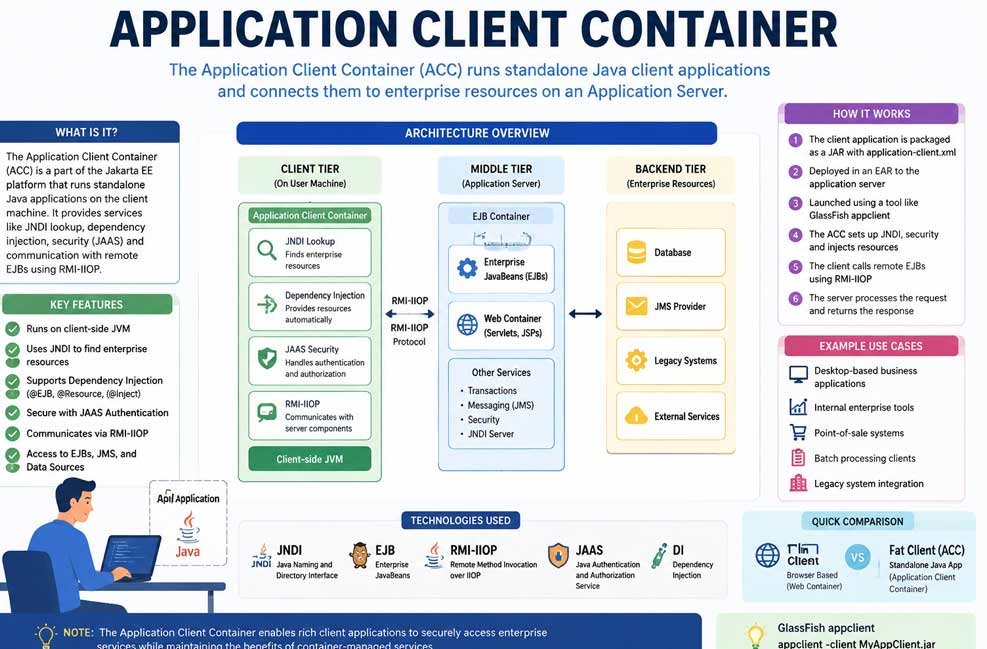
An application client container, often called ACC, is a managed runtime that runs standalone Java client applications. It is part of the Jakarta EE platform, which was previously known as Java EE. The container gives desktop or command-line Java programs many of the same enterprise features available to server applications.
Unlike a normal Java program that works completely on its own, an application running inside an application client container receives help from the container. It can automatically connect to enterprise resources, use built-in security, and communicate with remote business services without writing large amounts of setup code.
The application client container is mainly designed for fat clients. A fat client is a full Java application that runs on the user’s computer instead of inside a web browser. These applications often use Swing, JavaFX, or even simple command-line screens while still connecting to enterprise servers in the background.
One of the biggest advantages of the application client container is that it supports many enterprise services. These include dependency injection, JNDI lookup, JAAS security, remote EJB access, JMS messaging, and container-managed configuration. All of these services help developers build reliable enterprise applications more easily.
Although cloud applications and REST APIs have become more common, the application client container continues to support many existing business systems. Large organizations that already use Jakarta EE often keep these applications running because they remain secure, reliable, and well-tested.
Where the ACC Fits in Jakarta EE
To understand the application client container, it helps to see the bigger picture. Jakarta EE applications are usually divided into different layers. Each layer has its own job, making the system easier to build, maintain, and expand over time.
The first layer is the client tier. This is where users interact with the application. The application client container belongs here because it runs the standalone Java application on the user’s computer. The client handles the user interface and sends requests to enterprise services running on the server.
The second layer is the middle tier. This is where most business work happens. It contains the Web Container and the EJB Container. These server-side containers process requests, run business rules, manage transactions, handle security, and communicate with other enterprise resources.
The final layer is the backend tier. This layer stores information and connects with other systems. It may include databases, legacy business software, cloud services, external APIs, file storage, or messaging systems. The backend keeps business data safe and available whenever applications need it.
The application client container acts like a bridge between the client and the enterprise server. It lets desktop applications safely use enterprise services without placing business logic inside the client itself. This separation makes applications easier to update, secure, and manage.
Because each layer has its own responsibility, developers can improve one part without changing everything else. This design has helped enterprise Java systems remain useful for many years.
Thin Clients and Fat Clients
Enterprise applications usually use one of two client types: thin clients or fat clients. Knowing the difference makes it much easier to understand why the application client container exists.
A thin client usually runs inside a web browser. It uses technologies like HTML, CSS, JavaScript, and HTTP to communicate with a server. Almost all of the business processing happens on the server, while the browser mainly shows information to the user.
A fat client is different. It is a complete Java application installed on the user’s computer. The application has its own Java Virtual Machine (JVM) and often provides a richer desktop experience using Swing, JavaFX, or console-based interfaces.
Because the fat client runs locally, it can directly connect with enterprise resources through the application client container. It can perform JNDI lookups, communicate with remote Enterprise JavaBeans using RMI-IIOP, and use enterprise security without depending only on web pages.
Deployment is also different. Thin clients usually require only a web browser and a website address. Fat clients are packaged as Java applications and launched using tools provided by the enterprise application server, such as the GlassFish appclient launcher.
Thin clients are often easier to update because changes happen on the server. Fat clients may require installation or updates on user computers, but they can provide stronger desktop features and direct access to enterprise services that some organizations still require.
Neither approach is always better. The right choice depends on the application’s needs, security requirements, and how the business wants users to interact with its systems.
Main Parts of an Application Client Container
The application client container works because several important pieces work together. Each one has a specific job that helps the client application connect with enterprise resources safely and efficiently.
The first part is the client-side JVM. Every application client runs inside its own Java Virtual Machine on the user’s computer. The JVM loads classes, manages memory, executes Java code, and communicates with the operating system while the application is running.
Another important part is the client JAR file. This package contains the Java classes, supporting libraries, configuration files, and resources needed by the application. In many enterprise projects, the client JAR is included inside a larger Enterprise Archive, also known as an EAR file.
The application-client.xml deployment descriptor is another key component. This file can define the application’s main class, enterprise resource references, security roles, environment settings, callback handlers, and other deployment information. Since Java EE 5, many simple applications can replace much of this XML with annotations, although the file is still useful for larger deployments.
The application client container also prepares the JNDI environment. Java Naming and Directory Interface allows the application to find enterprise resources by logical names instead of hardcoded addresses. Developers can locate remote EJBs, JMS queues, topics, data sources, and other managed services through JNDI.
Another valuable feature is dependency injection. Instead of writing manual lookup code, developers can use annotations such as @EJB, @Resource, and @Inject. The container automatically provides the required objects, making applications cleaner, easier to read, and simpler to maintain.
Remote communication is handled using RMI-IIOP. This protocol allows the client to call methods that actually run inside Enterprise JavaBeans on the application server. The developer writes code that looks like a local method call, while the container manages the network communication behind the scenes.
Security is provided through JAAS, or Java Authentication and Authorization Service. The application client container can collect user credentials, authenticate them against the enterprise server, and establish a secure identity. That identity is then used whenever the client accesses protected enterprise resources.
Together, these components create a managed environment where developers can focus on business features instead of building connection, security, and configuration code from scratch.
How the Application Client Container Works
Now that you know the main parts, let’s look at how an application client container works from beginning to end. The process is much easier to understand when broken into simple steps.
The first step is creating the Java client application. Developers build a standalone Java program that may include a desktop interface, command-line tools, reporting software, or batch-processing tasks. The application is designed to communicate with enterprise services running on a Jakarta EE server.
After development is complete, the application is packaged into a client JAR file. This package contains the compiled classes, required interfaces, libraries, and configuration files. If needed, the application-client.xml deployment descriptor is also included to define enterprise resources and deployment settings.
In many enterprise applications, the client JAR becomes part of a larger Enterprise Archive (EAR) file. The EAR is deployed to an enterprise application server such as GlassFish, Payara, or another compatible Jakarta EE server. During deployment, the server recognizes the client module and prepares it for execution.
When the user starts the application using a launcher like the GlassFish appclient tool, the application client container begins its work. It starts the client-side JVM, prepares the classpath, reads configuration files, creates the JNDI environment, and performs dependency injection where needed.
If the application requires secure access, the container starts the authentication process. Using JAAS, it may ask the user for login details through a configured callback handler. After successful authentication, the user’s security identity is created and prepared for future enterprise requests.
Once authentication is complete, the client can locate remote Enterprise JavaBeans, JMS resources, or data sources through JNDI. When the application calls a remote business method, the application client container manages the RMI-IIOP communication, sends the request to the server, and waits for the response.
The enterprise server processes the request inside its EJB container, performs the required business work, accesses databases or other systems if needed, and returns the result. The application client container receives the response, converts it back into Java objects, and passes the information to the client application.
This managed workflow allows developers to build powerful enterprise desktop applications without manually handling every connection, security check, or communication task.
JNDI and Dependency Injection
One of the biggest jobs of the application client container is helping the client find enterprise resources. Instead of saving server addresses or object details inside the code, developers can use JNDI (Java Naming and Directory Interface). Think of JNDI as a phone book that helps the application find the correct enterprise service.
With JNDI, the client can locate many resources. These include remote Enterprise JavaBeans (EJBs), JMS queues, JMS topics, data sources, and other managed services. The application only needs the resource name, while the container handles the connection behind the scenes.
In older Java applications, developers often wrote long JNDI lookup code. While this still works, modern Jakarta EE applications usually prefer dependency injection (DI) because it is simpler and easier to maintain.
The application client container supports annotations such as @EJB, @Resource, and @Inject. These annotations tell the container which resource the application needs. During startup, the container automatically provides the correct object without extra setup code.
Dependency injection also helps reduce mistakes. Developers spend less time writing repeated connection code and more time building useful business features. This makes the application cleaner and easier to update in the future.
Although annotations handle many situations, JNDI still remains important. Some larger enterprise systems use manual lookups for advanced configurations or when working with older applications.
Remote EJB Calls and RMI-IIOP
One reason companies use the application client container is its ability to communicate directly with Enterprise JavaBeans (EJBs) running on an application server. EJBs contain business logic such as processing payments, creating reports, checking inventory, or handling customer information.
The communication between the client and server usually happens through RMI-IIOP, which stands for Remote Method Invocation over Internet Inter-ORB Protocol. While the name sounds complex, the idea is simple. The client calls a method, and the server performs the work.
The application client container prepares the connection automatically. When the client requests a remote EJB through JNDI or dependency injection, the container creates the objects needed for communication.
After that, the client sends the request to the enterprise server. The EJB container receives it, runs the required business logic, and may access databases, messaging systems, or other enterprise services.
When the work is finished, the server sends the result back. The application client container receives the response, converts it into Java objects, and returns it to the client application.
Because everything travels across a network, developers should also think about network speed, connection failures, and version compatibility. Good error handling makes enterprise applications much more reliable.
Security in the Application Client Container
Security is one of the strongest features of the application client container. Many enterprise systems manage private customer records, financial data, medical information, or government services. Strong protection is necessary.
Most application client container environments use JAAS (Java Authentication and Authorization Service) for user authentication. When the application starts, the container can ask the user to enter login details using a configured callback handler.
After the server checks the username and password, it creates a security identity for that user. This identity is then used whenever the client communicates with enterprise resources.
The application client container also supports role-based security. Different users can receive different permissions. For example, an administrator may update records, while a normal employee may only view information.
Communication between the client and server can also use SSL or TLS encryption. This protects information while it travels across the network, making it much harder for others to read sensitive data.
Another useful feature is security context propagation. After a user signs in, the same identity is passed to the EJB container. This allows server-side components to know exactly who is making each request.
Developers should avoid storing passwords inside the application. Login details, certificates, and server settings should always be managed securely using enterprise configuration.
Packaging and Running an ACC Application
After development is complete, the client application must be packaged correctly. Most enterprise projects place the compiled Java classes, required interfaces, configuration files, and supporting libraries inside a client JAR file.
If needed, the package also contains the application-client.xml deployment descriptor. This file can define the application’s main class, security roles, callback handlers, resource references, environment entries, and other deployment settings.
Many enterprise applications include the client JAR inside an Enterprise Archive (EAR) file. The EAR is deployed to the Jakarta EE application server, where the server recognizes the application client module.
GlassFish provides one of the best-known launch tools called appclient. A simple command such as:
appclient -client MyAppClient.jar
starts the client-side JVM, prepares the classpath, loads configuration files, creates the JNDI environment, performs dependency injection, and launches the application’s main() method.
Although GlassFish is the reference implementation, other Jakarta EE application servers also provide their own ways to run managed client applications. The exact tools may differ depending on the server being used.
Before moving an application into production, developers should test the client carefully. Missing libraries, incorrect interfaces, version differences, or configuration errors are common reasons why enterprise client applications fail to start.
ACC vs Other Java Containers
The application client container is only one part of the Jakarta EE platform. It works together with other containers, but each one has a different job.
The Web Container manages web applications such as Servlets, JSP pages, and browser requests. It mainly works with HTTP and serves users through web browsers.
The EJB Container manages Enterprise JavaBeans. It handles business logic, transactions, security, messaging, timers, and remote method calls. Most enterprise business processing happens here.
The Application Client Container is different because it runs on the user’s machine instead of the server. It manages standalone Java applications while still providing enterprise services such as dependency injection, JNDI, remote EJB access, and security.
All three containers support managed services, but they work in different places. The Web Container and EJB Container stay on the application server, while the application client container runs beside the desktop application.
It is also important not to confuse the application client container with a Docker container. A Docker container packages software for deployment, while an application client container is a runtime environment that provides enterprise Java services.
ACC Uses, Limits, and Future
The application client container is no longer used in every new Java project. Modern applications often rely on REST APIs, GraphQL, WebSockets, cloud platforms, and microservices instead of direct EJB communication.
Even so, the technology still has important uses. Many organizations continue to run large enterprise systems that were built years ago. Replacing these systems can be expensive and risky, so companies continue maintaining them.
The application client container is still common in internal business tools, desktop administration software, reporting applications, point-of-sale systems, secure government software, banking platforms, healthcare systems, and batch-processing programs.
Some enterprise applications also communicate with JMS messaging services for background work and asynchronous processing. The application client container can access these managed messaging resources just like it accesses remote EJBs.
Modern deployment methods have also introduced new possibilities. Some companies package application client container applications inside Docker containers together with the Java runtime and required libraries. This creates repeatable deployments for background jobs or automated workloads, although it is less common for traditional desktop software.
When starting a brand-new project in 2026, many teams choose REST APIs or cloud-native designs. However, developers who support existing enterprise systems still benefit from understanding how the application client container works.
Bottom Line
The application client container remains an important part of the Jakarta EE platform, even though it is used less often than in the past. It gives standalone Java applications managed services such as dependency injection, JNDI lookup, JAAS security, remote EJB communication, and enterprise resource access without requiring developers to build these features themselves.
While REST APIs and cloud-native systems now power many new applications, the application client container still plays a valuable role in enterprise environments that depend on secure desktop software, legacy systems, batch processing, and direct enterprise integration. Understanding how it works helps developers maintain existing Java systems, troubleshoot enterprise applications, and make informed decisions when modernizing business software in 2026.
(FAQs)
What is the difference between a normal Java application and an application client container?
A normal Java application manages its own connections and configuration. An application client container automatically provides enterprise services like security, dependency injection, JNDI, and managed resource access.
Does the application client container require application-client.xml?
Not always. Modern Jakarta EE applications often use annotations such as @EJB, @Resource, and @Inject. However, application-client.xml is still useful for larger or more complex deployments.
Can an application client container access remote EJBs?
One of its main purposes is connecting standalone Java applications with remote Enterprise JavaBeans using JNDI and RMI-IIOP.
Is GlassFish the only server that supports the application client container?
GlassFish is a well-known reference implementation, but support also exists in other Jakarta EE server environments. The available tools and features may vary depending on the server.
Can an application client container work inside Docker?
Some organizations package application client container applications inside Docker images for automated jobs, testing, or consistent deployment. This approach is more common for background processing than for desktop applications.
Also Read: Brand Name Normalization Rules Explained: Keep Your Business Data Error-Free