Every business uses software every day. Employees open email, manage customer data, share files, create reports, and use many other programs to get work done. But there is one problem many companies do not notice. If even one program becomes old or misses an important update, it can become an easy target for hackers.
That is why tools like corporate software inspector have become more important than ever. Instead of waiting for a security problem to happen, companies can find weak software early and fix it before it causes damage. This helps protect important business data, customer information, and daily operations.
Modern businesses often have hundreds or even thousands of programs running on computers, laptops, and servers. Keeping every application updated by hand is almost impossible. Security teams need a faster and smarter way to check everything at once.
In this guide, you will learn what corporate software inspector is, how it works, its main features, its biggest benefits, and why many organizations use it as part of their cybersecurity plan. Whether you are an IT worker, a business owner, or simply curious about software security, this article will explain everything in simple and easy words.
What Is Corporate Software Inspector?
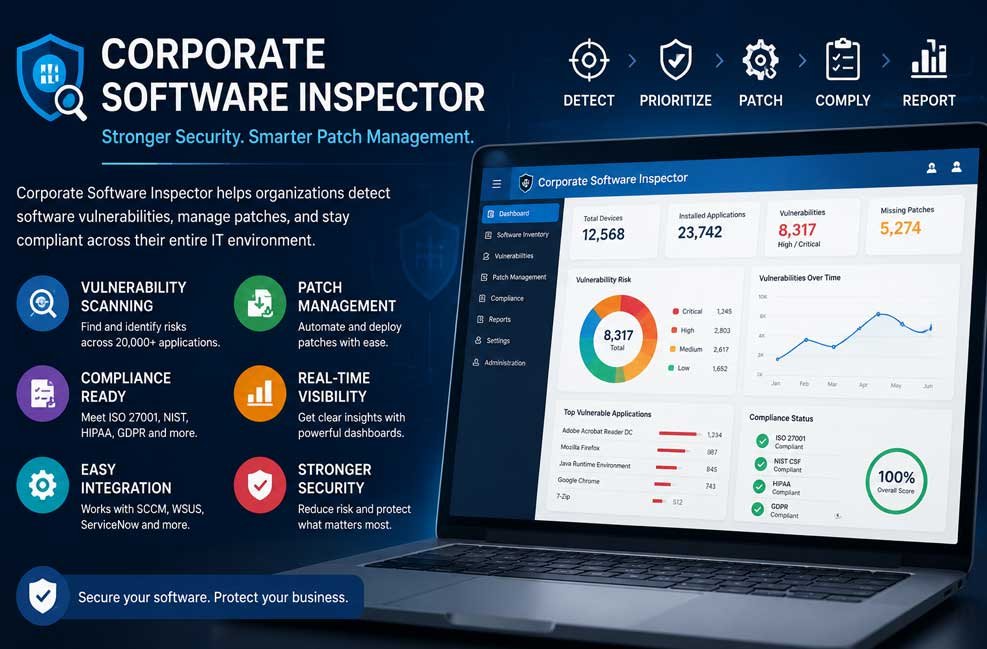
Corporate Software Inspector, often called CSI, is a business security tool that helps companies find software with known security problems. It scans computers, servers, and other business devices to discover which applications are installed and whether they need important security updates.
The tool was first introduced through Secunia, a company well known for software vulnerability research. Later, the technology became part of Flexera, where it continued to grow into a broader security platform. Today, many people also know it by its newer product name, Software Vulnerability Manager.
Instead of working like a basic software scanner, Corporate Software Inspector combines several important jobs into one platform. It checks installed software, compares it with trusted vulnerability information, helps manage security patches, and creates reports that show the overall health of the company’s software environment.
One useful feature is its authenticated scanning process. Rather than making guesses, the tool scans systems using proper permissions. This allows it to build a much more accurate software inventory and greatly reduces false results that can waste valuable time.
Corporate Software Inspector supports different operating systems, including Windows, macOS, and Red Hat Enterprise Linux (RHEL). This makes it useful for companies that use different types of computers instead of relying on only one operating system.
The platform also works well with Microsoft management tools like System Center Configuration Manager (SCCM) and Windows Server Update Services (WSUS). Because of this, companies can improve their security without replacing the systems they already use every day.
Why Companies Need Corporate Software Inspector
Most businesses use far more software than people realize. Besides Microsoft Office and Windows, employees also install web browsers, PDF readers, video meeting apps, design software, accounting programs, development tools, and many other business applications. Every one of these programs can contain security weaknesses.
Hackers often search for software that has not been updated. Once they find an old version, they may use a known security hole to enter a company’s network. Even one forgotten application can become the starting point of a much larger cyberattack.
Many companies try to manage updates by hand. This may work for a small office with only a few computers. But once a business grows to hundreds or thousands of devices, manual checking becomes slow, expensive, and easy to miss. Important updates may remain unnoticed for weeks.
Another common problem is third-party software. Many IT teams regularly update Windows but forget about software from other companies. Programs like browsers, media players, communication tools, and development software also need regular security updates because attackers often target them.
Corporate Software Inspector helps solve these problems by automatically checking software across the company. Instead of searching computer by computer, security teams receive one clear view of everything that is installed and which applications need attention first.
The platform also helps businesses reduce the time between finding a problem and fixing it. This period is often called the “time to patch.” The shorter this time becomes, the fewer chances attackers have to take advantage of known software weaknesses.
Another reason companies use this tool is visibility. Many organizations do not even know exactly which applications are installed across all departments. Corporate Software Inspector creates a complete software inventory, making it easier to remove old programs, manage licenses, and improve overall security.
How Corporate Software Inspector Works
Corporate Software Inspector follows a clear step-by-step process. Instead of only finding problems, it helps organizations move from discovery to repair and finally to confirmation that everything has been fixed correctly.
The first step is software discovery. The platform scans business devices and creates a detailed inventory of installed applications. It records software names, versions, and other useful information so security teams know exactly what exists across the network.
Next comes vulnerability detection. After collecting the software list, the system compares every application with a regularly updated vulnerability database. This database includes known software weaknesses collected from trusted sources, including vendor security notices and public vulnerability records such as CVEs.
Once weak software is found, the platform gives every issue a priority. It does not treat every problem the same. Instead, it looks at factors like how dangerous the weakness is, how easily hackers can use it, and how important the affected system is to the business.
After the risks have been ranked, Corporate Software Inspector helps prepare security patches. For many third-party applications, it provides ready-made patch packages that reduce the work normally required from IT teams. These patches can then be deployed through existing tools like SCCM or WSUS.
The final step is verification. After updates are installed, the system scans the devices again. This second scan confirms whether the patches worked correctly and whether the vulnerability has truly been removed. This extra check also creates useful records for future security reviews and compliance audits.
Software Scanning and Discovery
The quality of any vulnerability management system depends on how well it can discover software. If a company cannot see every application running across its network, it cannot fully protect those systems. That is why software discovery is one of the most important parts of Corporate Software Inspector.
The platform uses authenticated scanning instead of simple network guessing. With proper access rights, it collects detailed information directly from business devices. This provides a much more complete and reliable software inventory while reducing incorrect results.
Corporate Software Inspector scans desktop computers, laptops, servers, and supported operating systems across the business environment. It records application names, software publishers, version numbers, installation details, and other useful information that helps security teams understand exactly what is running.
This inventory becomes valuable for more than just cybersecurity. IT teams can also use it to find unused software, remove old applications, improve software licensing, and better manage company assets. One accurate software list supports many different business tasks.
Discovery also helps uncover hidden risks. Some departments may install software without informing the IT team. Older applications may remain on computers long after employees stop using them. Corporate Software Inspector helps reveal these forgotten programs before they become security problems.
Another advantage is reducing blind spots. Every unknown application creates uncertainty. By building one complete software inventory, companies gain much better visibility across their entire IT environment and can make smarter security decisions based on real information instead of assumptions.
Vulnerability Checks and Risk Scores
Finding installed software is only the beginning. The next job is understanding whether that software is safe. Corporate Software Inspector compares every discovered application with a trusted vulnerability database that receives frequent updates as new security problems are discovered around the world.
The platform gathers vulnerability intelligence from reliable sources, including software vendors and public security databases such as the National Vulnerability Database (NVD). This helps security teams work with verified information instead of rumors or outdated reports.
Each software weakness is then matched with known Common Vulnerabilities and Exposures (CVE) records whenever available. CVEs give every publicly known vulnerability a unique identification number, making it easier for security teams to track problems and understand their impact.
Not every vulnerability carries the same level of danger. Some may have little effect, while others could allow attackers to take control of important systems. Corporate Software Inspector assigns risk scores so IT teams know which issues need immediate attention and which can be handled later.
The platform also considers how important the affected device is to the business. A vulnerable application running on a critical business server usually receives a higher priority than the same application installed on a less important test computer. This helps teams focus their time where it matters most.
Daily vulnerability intelligence is another important advantage. New software weaknesses appear regularly, and attackers often move quickly. Frequent database updates help Corporate Software Inspector detect newly reported risks sooner, giving organizations a better chance to patch systems before those weaknesses can be exploited.
Patch Management for Business Software
Finding weak software is only half the job. The next step is fixing it. That is where patch management becomes important. A patch is a small software update that fixes security problems, improves stability, or corrects bugs. Installing these patches quickly helps keep business systems safe.
One of the biggest strengths of corporate software inspector is its support for third-party software. Many companies already update Microsoft products, but programs from other vendors are often forgotten. Web browsers, PDF readers, media tools, communication apps, and business software all need updates too.
The platform provides ready-made patch packages for many supported applications. This saves IT teams from creating update packages by hand. It also helps reduce mistakes and speeds up the entire patching process, especially in large organizations with many devices.
Another helpful feature is patch scheduling. Security teams can choose the best time to install updates, such as evenings or weekends, when fewer employees are working. This helps reduce business interruptions while still keeping systems protected.
Testing is also an important step. Even trusted updates should be tested on a small group of devices before they reach the whole company. This helps make sure the update does not create new problems with important business software.
After deployment, the platform tracks progress and checks whether each patch was installed successfully. If a problem appears, IT teams can investigate quickly and, when needed, use a rollback plan to return systems to a stable state.
Integration With SCCM, WSUS, and Other Tools
Most businesses already use tools to manage computers and software. Instead of replacing these systems, Corporate Software Inspector works alongside them. This makes setup easier and protects the company’s existing IT investment.
One of its best-known integrations is with Microsoft System Center Configuration Manager (SCCM), now known as Microsoft Endpoint Configuration Manager. This allows security teams to deploy third-party software updates using a familiar management console.
The platform also supports Windows Server Update Services (WSUS). This helps businesses distribute approved updates across their network without changing their normal update process.
Many organizations also connect Corporate Software Inspector with ServiceNow, BMC Remedy, and other IT service management platforms. When a serious vulnerability is found, a support ticket can be created automatically, helping teams respond more quickly.
Security teams may also connect the platform with SIEM systems. This allows vulnerability information to appear alongside other security events, giving analysts a clearer picture of possible threats across the company.
Some businesses also use APIs and custom connectors to connect the platform with asset management systems, reporting tools, and configuration databases. These connections reduce manual work and improve the flow of security information between different departments.
Main Features of Corporate Software Inspector
Corporate Software Inspector includes many useful features that work together to improve business security. Instead of solving only one problem, it supports the full process of finding, managing, and fixing software risks.
Some of its most important features include:
-
Authenticated software scanning for better accuracy
-
Complete software inventory across business devices
-
Support for Windows, macOS, and Red Hat Enterprise Linux
-
Regular vulnerability database updates
-
CVE matching for known security issues
-
Risk scoring based on severity and business impact
-
Third-party software patch management
-
Ready-made patch deployment packages
-
Integration with SCCM and WSUS
-
Dashboards with real-time security information
-
Compliance reporting for audits
-
Rescanning after patch deployment
-
Alerting for important software risks
-
API support and business tool integration
These features help security teams spend less time searching for problems and more time fixing the issues that matter most.
Who Should Use Corporate Software Inspector?
Corporate Software Inspector is mainly designed for medium-sized and large organizations that manage many computers, servers, and software applications. The larger the environment becomes, the more valuable automated vulnerability management usually becomes.
Healthcare organizations can benefit because patient information must remain protected. Regular software updates also support healthcare security programs and help organizations prepare for compliance checks.
Banks, insurance companies, and financial businesses also manage sensitive customer information every day. A strong patch management process helps reduce software risks that could affect important financial systems.
Government agencies often work under strict security rules. Centralized software scanning and reporting make it easier to monitor thousands of devices across different offices.
Manufacturing companies usually operate specialized software that runs important production systems. Knowing which applications need updates helps reduce security risks without stopping daily operations.
Schools, colleges, and universities also manage large numbers of computers across classrooms, offices, and computer labs. A central platform makes software management much easier.
The tool is valuable for several teams inside an organization. IT operations teams receive automated patch management, security analysts receive better threat information, compliance officers receive useful reports, and company leaders receive clear risk summaries for business decisions.
Corporate Software Inspector vs Traditional Tools
Traditional software management often depends on manual work. IT teams must search for updates, check software versions, create deployment packages, and track results by themselves. This process takes time and increases the chance of missing important updates.
Corporate Software Inspector brings these tasks together in one platform. It combines software discovery, vulnerability intelligence, risk ranking, patch management, reporting, and verification into a single workflow.
Another major difference is third-party application support. Older update systems often focus mainly on Microsoft software, while Corporate Software Inspector also helps manage many other business applications.
The platform also reduces human error. Automation lowers the chance of forgetting important updates or applying the wrong patch to business systems.
It is important to remember that Corporate Software Inspector is not the only vulnerability management solution available today. Other enterprise security platforms offer similar features. Businesses should compare pricing, supported software, deployment options, and long-term support before making a final decision.
Setup Tips and Best Practices
A successful deployment begins with good planning. Before installing the platform, companies should know which devices and applications are already running across the network.
Start with a small pilot group instead of the entire company. Testing on a limited number of computers helps identify possible issues before full deployment.
Always test important patches before installing them everywhere. Even security updates can sometimes affect older business software or custom applications.
Give security teams proper administrative access for authenticated scanning. Without enough permissions, the platform may not discover every application correctly.
Create clear rules for handling critical, high, medium, and low-risk vulnerabilities. This helps teams know which problems must be fixed immediately.
Keep regular backups and prepare a rollback plan before large software deployments. If an update creates an unexpected problem, systems can be restored more quickly.
After patch deployment, always perform another scan. This confirms that vulnerabilities have truly been removed instead of assuming every update worked correctly.
Finally, review reports regularly. Security is not a one-time job. Continuous monitoring helps businesses stay protected as new software vulnerabilities appear.
Limits and Things to Check
Like every security tool, Corporate Software Inspector has limits. It helps reduce software risks, but it cannot stop every cyberattack by itself. Good cybersecurity also requires employee training, backups, strong passwords, and other security controls.
Some updates may still require human approval. Critical business software often needs testing before installation because every company has different systems and business needs.
Older product information found online may also be outdated. Since the product has changed over time, businesses should always review the latest Flexera documentation before making purchasing or deployment decisions.
Some marketing articles include large statistics about risk reduction, supported applications, or return on investment. These numbers may change over time, so readers should confirm them using current vendor information or trusted industry research.
Companies should also check licensing costs, supported operating systems, cloud support, deployment choices, and integration options before choosing any enterprise vulnerability management platform.
Bottom Line
Corporate Software Inspector is much more than a software scanner. It is a complete vulnerability and patch management solution that helps businesses discover software, find security gaps, deploy updates, verify fixes, and support compliance. By combining accurate software discovery, trusted vulnerability intelligence, third-party patch management, and strong integration with existing IT tools, it helps organizations reduce security risks and manage software in a smarter and more organized way. For businesses that want better control over their software security in 2026, it remains a practical and valuable choice.
(FAQs)
Does Corporate Software Inspector only work with Microsoft software?
One of its biggest strengths is support for many third-party business applications in addition to Microsoft products.
Can Corporate Software Inspector help with compliance?
It provides reports, software inventories, vulnerability tracking, and patch records that support compliance efforts for standards such as ISO 27001, NIST, HIPAA, GDPR, PCI DSS, and SOX. However, the tool alone does not make an organization fully compliant.
Does Corporate Software Inspector work with SCCM and WSUS?
It integrates with Microsoft System Center Configuration Manager (SCCM), Microsoft Endpoint Configuration Manager, and Windows Server Update Services (WSUS) to support patch deployment.
Is Corporate Software Inspector suitable for small businesses?
Small businesses can use vulnerability management tools, but Corporate Software Inspector is generally most useful for medium-sized and large organizations with many devices, applications, and complex IT environments.
Can Corporate Software Inspector prevent every cyberattack?
It reduces software-related risks by finding vulnerabilities and helping manage patches, but complete cybersecurity also requires strong passwords, user awareness, backups, network security, and other protective measures.
Also Read: Comporium Webmail: The Complete Guide to Login, Setup, and Easy Fixes