Have you ever contacted a company and waited hours, or even days, for a simple reply? Most people have. Slow customer support can leave buyers frustrated, while support teams struggle to keep up with hundreds of messages every day. As businesses grow, answering every question by hand becomes harder and more expensive.
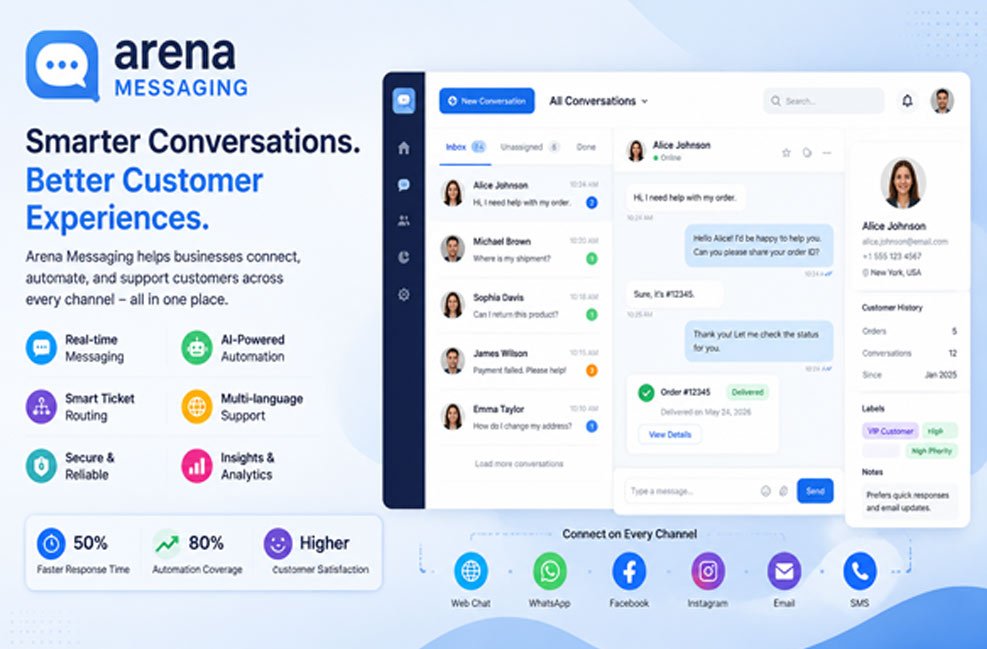
This is where arena messaging comes in. It helps businesses manage customer conversations in one place while using smart automation to handle many everyday tasks. Instead of spending time on repeated questions, support teams can focus on solving real customer problems.
Today, customers expect quick replies. They want answers about orders, returns, payments, or account issues without waiting in long queues. Companies also want to reduce support costs without lowering service quality. A modern messaging system helps both sides by making communication faster and smoother.
In this guide, you will learn what arena messaging is, how it works, its main features, how automation improves customer support, and why many businesses are using tools like this in 2026 to deliver faster and better service.
What Is Arena Messaging?
Arena messaging is a business communication system that helps companies manage customer conversations across different digital channels. Instead of using separate tools for emails, chat, and support tickets, businesses can bring everything together into one organized platform.
The main goal is simple. It helps companies reply faster, keep conversations organized, and reduce the amount of manual work for support teams. Every customer message can be tracked, sorted, and managed from one central place.
Unlike a basic chat app that only lets people exchange messages, arena messaging is built for business communication. It supports customer service, sales, marketing, and internal teams that need fast and reliable communication every day.
Many businesses also connect the platform with customer records, order systems, helpdesk software, and CRM tools. This gives support agents useful information without switching between different programs, making every conversation easier to handle.
Arena messaging is designed for different industries. Online stores use it to answer shopping questions, software companies use it to help customers with technical problems, and service businesses use it to manage appointments, requests, and customer updates.
Because it supports web browsers, desktop computers, tablets, and mobile phones, both customers and employees can stay connected from almost anywhere.
How Arena Messaging Works
The process starts when a customer sends a message through a company website, mobile app, live chat, or another supported communication channel. Instead of placing every message into one large inbox, the platform begins organizing everything automatically.
First, the system gathers useful details. It may collect the customer’s name, account information, previous conversations, recent orders, or the type of problem they are reporting. Having this information ready saves valuable time later.
Next comes message sorting. Smart automation and AI look at the message to understand what the customer needs. A billing question, for example, is different from a delivery question or a technical issue. The system recognizes these differences before an agent even opens the conversation.
Once the request is understood, the platform sends it to the correct department. Billing questions go to billing specialists, technical problems reach technical support, and sales questions move to the sales team. This removes the slow manual sorting process.
When an agent receives the conversation, everything is already prepared. They can see earlier chats, customer details, order history, and important notes. Instead of asking customers to explain everything again, agents can start solving the issue right away.
Simple questions may never need a human agent at all. Automated replies and AI chatbots can answer common requests such as shipping times, return policies, business hours, or password help. If the problem becomes more difficult, the conversation moves smoothly to a real support employee.
Main Features of Arena Messaging
One of the biggest strengths of arena messaging is its real-time communication. Messages are delivered almost instantly, allowing businesses and customers to chat without long delays. Fast communication creates a smoother experience and helps problems get solved much sooner.
Another important feature is near-zero latency. This simply means messages travel very quickly between customers and support teams. During busy shopping seasons or large online events, fast delivery helps businesses continue serving customers without slowing down.
Security is another major part of the platform. Customer information often includes personal details, payment questions, or account data. Arena messaging protects these conversations through secure communication methods and encryption to help reduce unauthorized access.
The platform is also built to handle large numbers of users at the same time. Whether a business receives hundreds or even millions of messages during busy periods, the system is designed to continue working without major performance problems.
Cross-device support makes communication even easier. Customers may start a conversation on their phone and continue later on a laptop or desktop computer. Support agents can also work from different devices without losing conversation history.
Another useful feature is its ability to connect with many business systems. CRM software, helpdesk platforms, order management systems, shipping tools, and marketing platforms can all work together with arena messaging. This gives employees one complete view of each customer.
The platform also stores message history and customer records in one place. Agents can quickly review earlier conversations, making follow-up support much easier. Customers no longer need to repeat the same information every time they contact the business.
Many platforms also include reports and performance tracking. Managers can measure first response time, ticket resolution time, customer satisfaction scores, and support workload. These reports help businesses improve customer service over time.
Arena Messaging Automation Tools
Automation is one of the biggest reasons businesses choose arena messaging. Instead of completing every task by hand, the system performs many routine jobs automatically. This allows support teams to spend more time helping customers with difficult problems.
One important automation tool is automatic ticket routing. Rather than asking employees to read every new message and decide where it belongs, AI understands the request and sends it directly to the correct team. This removes unnecessary waiting and improves response speed.
Another helpful tool is AI-powered FAQ support. Customers often ask the same questions every day about shipping, returns, payments, store hours, or account settings. Smart chatbots can answer these common questions immediately by using a company knowledge base.
Order updates can also be automated. When arena messaging connects with shipping or order management systems, customers receive tracking numbers, shipping updates, and delivery notices without needing to contact customer support. This greatly reduces “Where is my order?” requests.
After a support case is finished, the platform can automatically send customer satisfaction surveys such as CSAT or Net Promoter Score (NPS) forms. Because these follow-ups happen automatically, businesses collect more feedback and better understand customer experiences.
Automation also protects support teams from unwanted messages. Built-in spam and bot detection filters remove fake messages before they reach the support inbox. This keeps agents focused on real customers instead of wasting time sorting through junk conversations.
Another useful feature is automatic language detection and translation. The system recognizes the customer’s language and translates messages instantly. Agents can reply in their own language while customers receive the answer in theirs, making global support much faster.
Finally, smart escalation rules help urgent problems receive immediate attention. The platform can detect important words such as “cancel,” “legal,” or other signs of frustration through sentiment analysis. High-priority conversations are automatically moved to experienced agents, helping businesses solve serious issues much faster.
Faster Ticket Routing
One of the slowest parts of traditional customer support is ticket sorting. Every new request must be read, understood, and sent to the correct department. When hundreds of messages arrive every hour, this manual process creates long delays before anyone even starts working on the problem.
Arena messaging removes much of this delay with AI-powered ticket routing. The system studies each message, understands the customer’s request, and automatically sends it to the right team. This simple step saves valuable time for both customers and support agents.
For example, a refund request can go directly to the billing department, while a login problem reaches technical support. Product questions can move to the sales team, and shipping concerns can be sent to order support. Each request reaches people with the right skills from the very beginning.
Smart routing also improves first response time because agents no longer waste minutes moving tickets between departments. Instead of opening a mixed inbox filled with unrelated requests, each team receives organized conversations that match their work.
Another advantage is fewer mistakes. Manual sorting sometimes sends tickets to the wrong department, forcing customers to wait even longer. Automatic routing reduces these errors and creates a smoother support experience.
The system can also recognize urgent cases. Messages that contain warning words or show signs of customer frustration can move to the front of the queue automatically. This helps businesses respond quickly when problems need immediate attention.
Instant Answers With Chatbots
Chatbots are one of the most useful parts of a modern support system. Instead of waiting for a support agent, customers can receive answers within seconds. This works well for simple questions that businesses receive every day.
For example, people often ask about shipping costs, return rules, payment methods, business hours, password resets, or account updates. A chatbot can answer these questions immediately by using the company’s knowledge base.
This kind of self-service helps customers any time of the day, even outside normal business hours. Someone shopping late at night can still get useful information without waiting until the next morning.
Chatbots also reduce the number of simple tickets that reach human agents. This gives support teams more time to focus on technical issues, billing problems, or other requests that need personal attention.
A good chatbot also knows its limits. If it cannot answer correctly, it should pass the conversation to a real support agent without making the customer repeat everything again. This creates a much smoother experience.
To keep chatbots useful, businesses should review conversations often. New products, updated policies, and customer feedback should be added to the knowledge base so answers stay correct and helpful.
Better Order and Delivery Updates
One of the biggest reasons customers contact support is to ask where their order is. These questions take a lot of time, even though the answer is often already available in the shipping system.
Arena messaging helps solve this problem by connecting directly with order management and delivery systems. Customers can automatically receive tracking numbers, shipping updates, and expected delivery dates without contacting support.
The platform can also send alerts when an order has been packed, shipped, delayed, or delivered. This keeps customers informed during every step of the delivery process.
Proactive updates reduce customer worry because people do not need to guess what is happening. They already know the latest status before they think about asking.
Support teams also benefit. Since fewer people ask about deliveries, agents have more time to solve other customer issues that need personal help.
For online stores, this simple automation can save many support hours every week while improving customer satisfaction at the same time.
Language and Global Support
Many businesses now serve customers from different countries. Language differences can slow down customer support if agents and customers cannot understand each other easily.
Arena messaging helps by automatically detecting the customer’s language. It can translate incoming and outgoing messages so conversations become much easier.
An agent may write a reply in English while the customer reads it in Spanish, French, German, Arabic, or another supported language. The customer receives the information in a language they understand.
This removes the need to copy messages into separate translation websites. Support becomes faster, smoother, and more comfortable for both sides.
Even though automatic translation has improved a lot, businesses should still review important messages. Legal matters, payment issues, or technical instructions may need a human check to make sure every detail is correct.
For companies that sell products around the world, multilingual support helps build trust and gives customers a better overall experience.
Why Businesses Choose Arena Messaging
Faster Customer Replies
The biggest benefit of arena messaging is speed. Customers receive replies much faster because many routine tasks happen automatically before a support agent joins the conversation. This reduces waiting time and helps customers get answers when they need them.
Lower Support Costs
Another major advantage is lower operating costs. Businesses spend less time answering the same questions again and again. As a result, support teams can handle more customer requests without hiring extra staff, helping companies save both time and money.
Better Work for Support Agents
Support agents also enjoy a better workday. Instead of sorting tickets or answering repeated questions hundreds of times, they can focus on solving more important customer issues. This improves productivity and allows agents to provide higher-quality support.
Better Experience for Customers
Customers also benefit from arena messaging. They receive faster answers, automatic order updates, cleaner communication, and quicker solutions. These improvements create a smoother support experience and help build stronger trust between customers and businesses.
Helpful Reports and Analytics
Managers gain valuable insights through reports and analytics. They can track first response time, ticket resolution time, customer satisfaction, and team performance. These reports make it easier to find areas that need improvement and measure overall support success.
More Personal Customer Support
Because every customer conversation is stored in one place, businesses can offer more personal support. Agents can quickly view previous chats, order history, and customer details without asking the same questions again. This saves time and creates a better customer experience.
How Arena Messaging Improves Customer Support
Good customer support is not only about answering quickly. It is also about giving the right answer the first time. Arena messaging helps by sending every request to the right person from the beginning.
Automation removes many small tasks that normally slow agents down. Ticket routing, language translation, spam filtering, and order updates all happen automatically behind the scenes.
The platform also collects useful customer details before the conversation begins. Agents can immediately see previous chats, recent orders, account details, and earlier support cases. This saves time for everyone.
Automatic follow-up surveys also help businesses understand how customers feel after receiving support. Whether using CSAT or Net Promoter Score (NPS) surveys, companies collect valuable feedback that can improve future service.
Spam and bot detection keeps support inboxes clean by blocking fake messages before they reach employees. This allows agents to spend their time helping real customers instead of sorting unwanted traffic.
Some systems also use sentiment analysis. If a customer sounds frustrated or uses urgent words such as “cancel” or “legal,” the conversation can automatically move to senior staff for faster handling.
Together, these features create shorter waiting times, faster solutions, happier customers, and a more organized support team.
Best Ways to Use Arena Messaging
Businesses should avoid trying to automate everything on the first day. A better approach is to begin with simple tasks like FAQ answers, order tracking, or welcome messages.
As the team becomes comfortable with the system, more workflows can be added. Ticket routing, follow-up surveys, language translation, and escalation rules can be introduced step by step.
It is also important to connect arena messaging with CRM software, helpdesk platforms, order management systems, and marketing tools. These connections allow customer information to move smoothly between systems.
Employees should receive proper training before automation goes live. Agents need to know when the system handles a conversation well and when a human should step in.
Businesses should review chatbot conversations regularly. If customers ask questions the bot cannot answer, the knowledge base should be updated so future replies become more helpful.
Finally, managers should monitor performance reports often. Watching response times, customer satisfaction, fallback rates, and ticket trends helps improve automation over time.
Limits and Things to Consider
Although automation offers many benefits, it cannot solve every customer problem. Some situations need human understanding, careful thinking, or special attention that software cannot fully provide.
Chatbots sometimes misunderstand unusual questions or give incomplete answers. Because of this, customers should always have an easy way to reach a real support agent.
Setting up a messaging platform also requires planning. Businesses may need time to connect existing systems, train employees, and build helpful chatbot content before seeing the best results.
Security should always remain a priority. Customer conversations often include private information, so businesses must protect data with strong security, encryption, and safe access controls.
Companies should also follow local privacy and data protection rules. Protecting customer information builds trust and helps avoid legal problems.
Another important point is balance. Too many automatic messages may annoy customers. Automation should make communication easier, not make people feel like they are talking only to machines.
The Future of Arena Messaging
Business communication continues to improve every year. AI is becoming better at understanding customer questions, predicting problems, and giving faster answers.
Future systems will likely offer even more personal support. By studying customer history and preferences, businesses may solve problems before customers even contact support.
CRM connections will become stronger, giving agents a complete picture of every customer in one place. Messaging, orders, payments, support history, and marketing information may all work together.
More companies are also moving toward true omnichannel communication. Customers will be able to move between websites, mobile apps, email, social media, and live chat without losing the conversation.
Language tools will continue improving, helping businesses support customers across many countries with greater accuracy and speed.
Even as AI grows, human agents will remain important. Technology can answer simple questions, but people will always be needed for complex situations, careful decisions, and personal customer care.
Bottom Line
Arena messaging gives businesses a smarter way to manage customer support. By combining real-time communication, AI automation, ticket routing, chatbot support, language translation, order updates, and system integrations, it helps teams respond faster while reducing manual work. The goal is not to replace people but to let technology handle routine tasks so support agents can focus on solving the problems that matter most. When planned and managed well, it can improve customer satisfaction, increase team productivity, and support long-term business growth.
(FAQs)
Can arena messaging work with other business software?
Many businesses connect it with CRM systems, helpdesk software, order management platforms, shipping tools, and marketing systems to create a smoother support process.
Will automation replace human support agents?
Automation handles simple and repeated tasks, while human agents continue solving complex issues, sensitive cases, and situations that need personal attention.
Is arena messaging suitable for small businesses?
Small businesses can begin with simple automations like FAQ chatbots or order tracking and expand as their customer support needs grow.
Is customer information secure in arena messaging?
Most business messaging platforms include security features such as encryption, access controls, and secure data handling. Companies should also follow privacy laws and security best practices.
Which industries can benefit from arena messaging?
Many industries can use it, including e-commerce, banking, healthcare, education, software companies, travel, telecommunications, logistics, and professional services.
Also Read: GramSnap Explained: How It Works, Is It Safe, and Should You Use It?