Connect with us

Health

World Safety Day 2026: Ergonomics Is the UK Remote Worker’s Blind Spot

Published

on


The hybrid work model, accelerated by the COVID-19 pandemic, is now the new normal for most professionals in the UK. As many employees and organisations balance their time between home working practices, these have led to necessary adaptations in the way that we work. And with companies working to ensure that their offices — when they are open — are safe to visit, the home office setup has become an ergonomic afterthought. That distinction matters to both officials and employers, especially when it has never been clearer that workplace safety extends beyond the four walls of a brick-and-mortar office.

World Safety Day 2026 is an important landmark for the organisations, to go back and evaluate its workplace health and safety policies. For the remote workforce, this means re-evaluating not only office but home and hybrid ergonomics. The cumulative stresses of poor posture and suboptimal desk set-up in particular can seep into productivity as well as health and even total well-being. So this is where tools like the best laptop dock for hybrid workers can help — bridging inconsistent workspace arrangements and supporting individual well-being.

The post-pandemic hybrid work thing: The health piece

When the UK’s first lockdown was announced, millions of employees found themselves working from home at no notice and with scant consideration for proper ergonomic health. Indeed, a great many workers arrived at their jobs on kitchen tables and sofas and even their beds — environments that weren’t ever designed for extended productivity or comfort. Although many employees embraced a transition to hybrid work for the flexibility it promised, it has exposed an underappreciated vulnerability in workplace safety: The lack of formal ergonomic support at home.

Employers, too, can play a role to ensure employees have the right tools for their work and their environments lead to health and well-being. But in an era of hybrid work that’s now the reality, there are plenty of companies that haven’t done a proper health check on how their remote setups are running. This is what drives WSD (Workplace Stress Diagnosis): the physical toll of spending hours at poorly designed workstations. Poor desks, unsupportive chairs, and ill-fitting equipment all take a measurable physical toll on the body.

According to the UK Health and Safety Executive (HSE) , musculoskeletal disorders (MSDs) are the most common cause of lost working days. The HSE has also recorded a rise in MSDs linked to remote working. With the decline of in-office interaction, workplace health issues that were once addressed collectively have now become individual concerns for each employee to manage alone.

WSD: Employees Saw Remote Workspaces As Dangerous

WSD (Workplace Stress Diagnosis) is a gradually implemented practice when conducting long-lasting health checks. For now-hybrid and -remote workers, WSD must expand beyond only clearly defined office spaces in the new world of work — but into the home office as well. From a company perspective, having ergonomic assessments is included within the policies for company health and safety — for both office workers as well as remote ones.

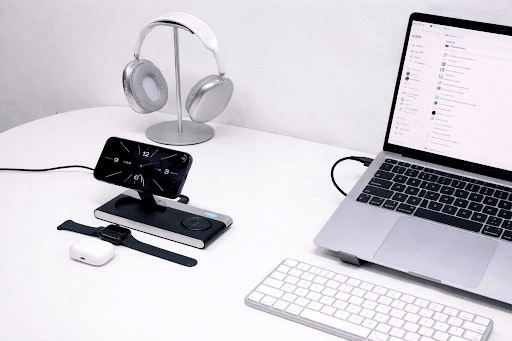
For example, if you have remote employees, supply them tools and resources that promote better ergonomics. Much of the answer lies in equipping employees with the right tools. The USB-C laptop stand with docking station is an easy fix for some of the difficulties that come from poor desk setups. Not only does this save employees time checking off the boxes to set up their home office, it also lessens the cognitive load of reestablishing one’s workspace over and over again.

On the other hand, employees should adopt a personal responsibility approach to create an ergonomically friendly work environment. Small investments in tools to promote good posture and alleviate stress, or avoid too much time spent sitting down at the same desk, can travel far. Then again, as awareness around health and wellness rises, it’s becoming clear that self-care is more than fitness or mental health — it also has to do with how we navigate our workspaces.

The Employee View: Small Change, Huge Impact

The employee can see an obvious need for ergonomics. Most of us are working from home now, and this can mean the lines between home life and work life often become murky. Employees may be forced to work from places not designed for hours of distraction-free intensity — such as living rooms, bedrooms or makeshift kitchen offices. This does allow for some flexibility but puts massive strain on the body.

The truth of the matter, though, is that a poor desk setup can lead to serious health consequences— to wit: back pain, wrist injury and eye strain. In fact, these chronic physical issues directly impair your productivity and work performance. The best laptop dock for hybrid workers and ergonomic solutions like it are essential in combating this problem.

A good setup can help with posture, eye strain and productivity. An excellent example of how easy it can be done without lifting a finger, is the USB-C laptop stand with a docking station. While this tool makes the every day set up simple, it also helps add comfort — two facets that uniquely boost work output, by raising the laptop to eye level and reducing neck strain, and allowing for peripheral connections.

Workplace: Building a Health-Aware Hybrid Work Force

Employers can supplement encouragement to engage in healthy habits with direct facilitation of those habits through small environmental changes. One easy, inexpensive solution is for companies to provide hybrid employees with ergonomic tools. Instead of just providing advice about posture or ergonomics, equipping employees with the right tools — adjustable desks or laptop stands, for example — is an investment in their health and productivity.

Employers could also consider offering subsidies or reimbursement options to employees who build their own ergonomic setups. That would demonstrate that a company understands how essential ergonomics is to creating a healthy, productive workplace.

Bridging the Ergonomics Gap in Hybrid Work

The UK appears to be sticking with hybrid working, and ergonomics will no doubt need to headline workplace health policies. Addressing the health challenges posed uniquely by remote and hybrid workspaces, from both employer and employee perspectives, is not just a compliance issue, but rather a performance and well-being issue.

It is a “call to action” for employers to relook and recalibrate the ergonomics of their hybrid workforce — which includes at-home office setups as World Safety Day 2026 (Oct. 27) approaches. Organisations can assist with the physical difficulties of remote working for their employees, simply by being available to help them with things like an all-in-one laptop dock for hybrid workers or USB-C laptop stand with docking station.

With hybrid work continuing to play out, it’s critical that companies create a workspace where ergonomics and well-being are front-of-mind — both in the professional office and at home. In the future of work, we need to reassess how we design our spaces so that productivity does not impact your health.

Ready to support your team’s ergonomic health? Explore Mukiya’s range of hybrid work solutions at mukiya.com/work-safe-smart and use code WORKSAFE for an exclusive discount.


Continue Reading
Сollaborator

Category

Trending