
Tech
Mastering Perspective: Why 3D Camera Control Is the Missing Link in Digital Art

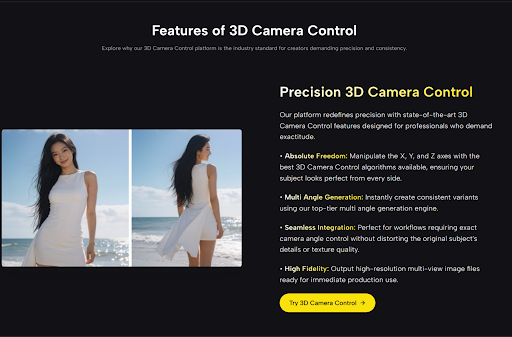
Have you ever looked at a generated image or a stock photo and wished you could just take one step to the left?
It is a subtle desire, but a persistent one. You have a character that looks incredible, but they are turned slightly away from the imaginary person they are supposed to be talking to. Or you have a product shot that is almost perfect, but the angle hides the most important button.
For decades, we have accepted that 2D images are frozen in time and space. Once the pixels are set, the perspective is locked. Trying to force a change meant using the “Warp” tool in Photoshop—which usually results in a distorted, unnatural mess—or spending hours repainting the subject from scratch.
However, the rigidity of the 2D frame is beginning to dissolve. I recently spent some time experimenting with 3D Camera Control AI, a tool designed to unlock the hidden spatial data within flat images. It turns the concept of a “still image” into something surprisingly fluid.
Under the Hood: A Personal Technical Observation
Seeing the Invisible Geometry
To understand why this is different from standard photo editing, we have to look at how the AI “sees.” In my testing, when I uploaded a flat JPEG, the system didn’t just treat it as a canvas of colors.
Instead, it appeared to generate an immediate, invisible Depth Map. It calculated that the nose is closer than the ears, and the chest is closer than the background. It effectively builds a temporary 3D scaffold based on lighting cues.
The Tactile Feeling of Control
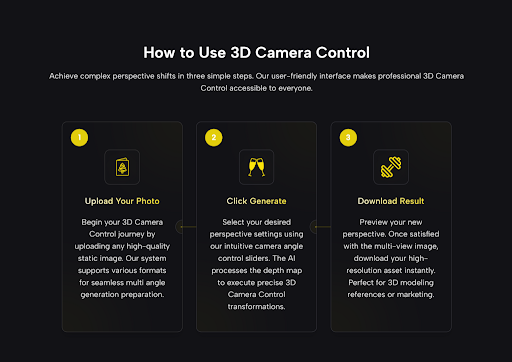
The interface offered me control over the X, Y, and Z axes.
- X-Axis (Pitch): Tilting the camera up or down.
- Y-Axis (Yaw): Orbiting around the subject.
- Z-Axis (Roll): Adjusting the horizon line.
The most striking moment in my evaluation was using the Y-Axis slider. As I moved it, the AI didn’t just stretch the face; it actually revealed the side of the cheek that was previously hidden. It felt less like editing a photo and more like pausing a video game and rotating the camera stick.
Warping vs. True 3D Control: The Difference
It is easy to confuse this with simple “perspective correction” tools found in older software. To clarify the distinction, I have compared my experience with traditional tools versus this AI approach.
The Evolution of Perspective Adjustment
| Feature | Traditional 2D Warping (Photoshop) | AI 3D Camera Control |
| Method | Stretching Pixels. Dragging corners to fake a new angle. | Volumetric Synthesis. Reprojecting pixels onto 3D geometry. |
| The Result | Distortion. Faces often look “squashed” or unnatural. | Realism. Anatomy tends to hold its volume and shape. |
| Hidden Details | Impossible. You cannot show what isn’t there. | Generative. The AI predicts and paints hidden sides (e.g., an ear). |
| Background | Static. The background warps with the subject. | Separated. The subject rotates independently from the depth field. |
Unlocking New Creative Workflows
Beyond the novelty of spinning a picture, I found several practical scenarios where 3D Camera Control solves genuine production headaches.
1. The “Consistent Character” Fix
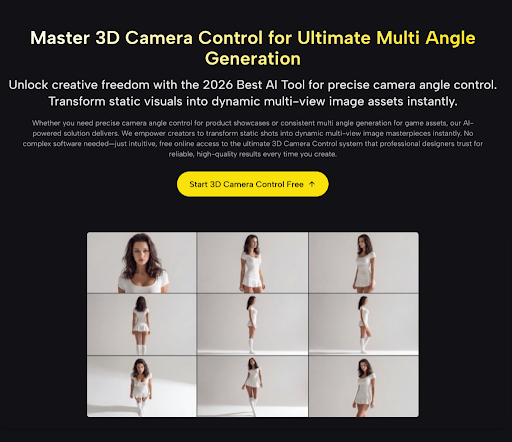
One of the hardest things in AI art is getting the same character in different poses. If you generate a character you love but they are facing forward, you can use this tool to create a “reference sheet.” By generating a slight left turn and a slight right turn, you effectively create a pseudo-3D model reference that you can use for comics or storyboards without losing the character’s unique features.
2. Rapid Concept Iteration
For industrial designers or concept artists, “selling” an idea often requires showing it from a flattering angle. Instead of re-rendering a 3D model (which takes time) or re-sketching (which takes effort), I found I could take a rough sketch, upload it, and find the most dynamic angle in seconds. It allows you to “scout” the best composition before committing to the final render.
The Limitations: A Note on “AI Hallucination”
While the results can be stunning, it is crucial to remain grounded in reality. This is an interpretation of 3D space, not a perfect physics simulation.
The “Blind Spot” Guesswork
During my tests, the system performed admirably with rotations up to 30 or 40 degrees. However, if you try to rotate a subject a full 90 degrees (from front view to side profile), the AI has to invent a lot of new information.
- Observation: Sometimes, the AI might guess the shape of the back of a head incorrectly, or blend the texture of a collar into the neck.
- The Video Factor: The technology creates fluid movement, but at extreme angles, you might see a shimmering effect (temporal instability) where the AI struggles to decide where a texture belongs. It is best used for “refining” an angle rather than completely “reinventing” it.
Conclusion: A New Tool for the Digital Toolkit
We are entering a phase where the barrier between “2D Artist” and “3D Artist” is becoming permeable. You no longer need to master complex mesh topology just to see your creation from a different viewpoint.
AI Video Generator Agent is not a magic button that fixes a bad image, but it is an incredibly powerful tool for refining a good one. It gives you the agency to step inside your image and find the perspective that tells your story best.
For anyone who has ever felt trapped by a fixed camera angle, this technology offers a welcome breath of creative freedom.







Igniting the Spark of Skills! WorldSkills Shanghai 2026 Announced the Second Cohort of Dream Ambassadors

Blocked Drain Repair: From Diagnosis to a Long-Term Solution

A Calm, Structured Approach to Practical-Test Preparation

The Fastest Way To Buy Rakhi Online When You Have Forgotten The Date In The UK

Staging a Terraced House in London: Tips for the UK’s Most Common Property Type

The Real Reason FreeCell Feels Harder Than Solitaire (It’s Not Luck)

Melissa McKnight: Everything About Matt LeBlanc’s Ex-Wife

Anna Axster: The Filmmaker Behind Ryan Bingham’s Story and Her Own Success

A First-Time Buyer’s Guide to Buying a Home in Basingstoke

Breaking the Scalability Barrier: Designing Lean Growth Frameworks with Conversational Tech

Revolutionizing Healthcare: The Emergence of AI-Driven Analytics

Carol Kirkwood’s Journey: Her Real Age, Husband, Career, and More

Body Positivity and Bodycon: Embrace Your Shape with Homecoming Dresses

Aliza Barber: Meet Lance Barber’s Wife, Age, Life, Profile, Career and Net Worth

How Machine Learning and AI are Redefining the Future?

Evelyn Melendez: Jordan Knight’s Wife Bio, Marriage, Family, Career and Net Worth

Ilan Tobianah Biography: Family, Marriage, Lifestyle, Career and Net Worth

Who was Alice Marrow? Everything to Know About Ice-T’s and His Mother

King Von’s Autopsy Report: The Truth Behind the Tragic Death

Tea Leoni and Tim Daly Split – A Closer Look at Their Relationship and Breakup
Igniting the Spark of Skills! WorldSkills Shanghai 2026 Announced the Second Cohort of Dream Ambassadors
Blocked Drain Repair: From Diagnosis to a Long-Term Solution
A Calm, Structured Approach to Practical-Test Preparation
The Fastest Way To Buy Rakhi Online When You Have Forgotten The Date In The UK
Staging a Terraced House in London: Tips for the UK’s Most Common Property Type
The Real Reason FreeCell Feels Harder Than Solitaire (It’s Not Luck)
Melissa McKnight: Everything About Matt LeBlanc’s Ex-Wife
Anna Axster: The Filmmaker Behind Ryan Bingham’s Story and Her Own Success
A First-Time Buyer’s Guide to Buying a Home in Basingstoke
Breaking the Scalability Barrier: Designing Lean Growth Frameworks with Conversational Tech
-
 Health3 years ago
Revolutionizing Healthcare: The Emergence of AI-Driven Analytics
-
 News1 year ago
Carol Kirkwood’s Journey: Her Real Age, Husband, Career, and More
-
 Fashion2 years ago
Body Positivity and Bodycon: Embrace Your Shape with Homecoming Dresses
-
 Celebrity2 years ago
Aliza Barber: Meet Lance Barber’s Wife, Age, Life, Profile, Career and Net Worth