
Tech
How to Create High-Converting E-commerce Videos in 10 Minutes with Zero Experience

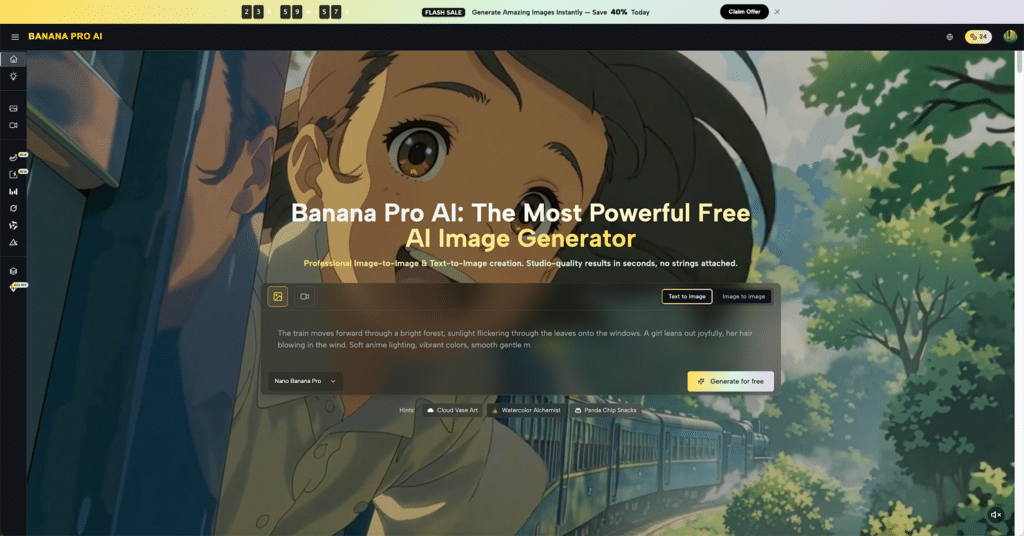
Running an online store is hard work. You have products to source, customers to answer, and orders to ship. To make matters worse, modern shoppers expect video content before they buy. But making videos is usually expensive and slow. Most sellers think they need to hire a professional team or spend weeks learning complicated editing software. That used to be true, but it is not the case anymore. New technology allows anyone to create professional clips quickly. With the right tools, a simple product photo can turn into a viral sales clip.
The secret lies in using smart automation. You do not need a camera crew, expensive lights, or a high-end computer. All you need is a clear idea and the right software. For those looking to streamline this process, Banana Pro AI offers a straightforward solution to turn text and images into dynamic videos instantly. This guide will explain exactly how to make high-quality videos for your store in just ten minutes.
- Why Video Content is Essential for Online Sales
Images are great, but videos sell. When a customer cannot touch or try on a product, they want to see it in action. A static photo might show the color of a dress, but a video shows how the fabric moves. A picture of a kitchen gadget shows what it looks like, but a video proves it actually works.
- Building Trust with Customers
Shoppers are skeptical. They want proof that a product is real and high-quality. Video bridges that gap. It gives a 360-degree view and builds confidence. When a shopper sees a product being used, they are far more likely to click “Add to Cart.”
- Grabbing Attention on Social Apps
Social media feeds move fast. Users scroll past static images without a second thought. Motion stops the scroll. A video with catchy movement and clear visuals grabs attention within the first three seconds. This is crucial for getting traffic to a store.
II. The Old Way vs. The New Way of Video Creation
Understanding why the old methods failed helps in appreciating the speed of modern tools.
- The Traditional Headache
In the past, making a single thirty-second ad required a lot of steps. You had to write a script, hire actors, rent a studio, film the shots, and then spend days editing. If you made a mistake, you had to start over. The cost was too high for small businesses.
- The Smart Automation Approach
Now, software does the heavy lifting. Banana Pro uses advanced technology to understand what you need. Instead of filming, you provide text or images. Instead of editing frame by frame, the system assembles the video for you. This shifts the focus from technical skills to creative ideas.
III. How to Use Banana Pro AI to Make a Video in 10 Minutes
Here is the practical part. This process requires no prior knowledge of video editing. Follow these steps to create a video ready for TikTok, Instagram, or your product page.
- Preparation and Scripting
Before opening the tool, know what you want to say. Keep it simple. Identify the main problem your product solves and the solution it offers. For example, “Tired of messy cables? This organizer keeps your desk clean.” A clear message is better than fancy effects.
- Inputting Your Content
Go to the Banana Pro interface. You will see options to start your project. You can choose to create a video from text or from images.
- Text-to-Video: Type your script or product description. The Banana Pro AI Video Generator analyzes the text to generate matching visuals.
- Image-to-Video: Upload your high-quality product photos. The tool will animate these images, adding movement and transitions to make them look like video footage.
- Customizing Your Video Settings
Different platforms need different formats. Banana Pro allows you to easily switch the Aspect Ratio between 16:9 for YouTube and 9:16 for TikTok or Instagram Reels. Additionally, by describing your desired look in the Prompt box—such as “cinematic lighting” or “minimalist design”—you can guide the AI to generate a video that matches your specific brand vibe.
- Generating the Video
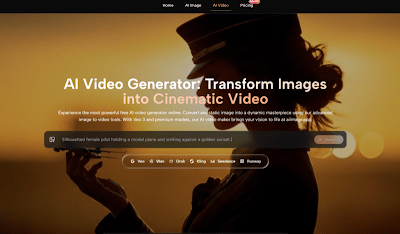
Once the inputs are ready, hit the generate button. This is where the magic happens. The system processes the data and renders a complete video. For specific video generation needs, you can use the Banana Pro AI Video Generator to streamline the workflow. In just a few minutes, the raw file is ready for review.

IV. Key Features That Make Banana Pro Stand Out
Not all video tools are the same. Banana Pro focuses on quality and ease of use specifically for content creators and sellers.
- High-Definition Visuals
Blurry videos kill sales. They make a brand look cheap. Banana Pro AI ensures that the output is crisp and clear, maintaining the quality of the original product photos. This professional look helps small brands compete with big retailers.
- Natural Movement and Physics
One big issue with early automation tools was that things looked fake. Objects would warp or move strangely. Banana Pro creates realistic motion. If you animate a photo of water pouring, it flows naturally. If a model is walking, the movement looks human. This realism is vital for convincing viewers.
- Speed and Efficiency
Time is money. Spending hours on one clip is not efficient. Banana Pro allows for bulk creation. A seller can create ten different variations of an ad in the time it takes to eat lunch. This allows for testing different angles to see what sells best.
V. Common Mistakes to Avoid
Even with a powerful tool like Banana Pro, users can make mistakes that hurt performance.
- Overloading with Information
Do not try to say everything in one video. Pick one selling point and stick to it. If a product is durable, affordable, and eco-friendly, make three separate videos. Cramming too much text onto the screen confuses the viewer.
- Ignoring Sound
While many people watch with sound off, sound is still crucial. Use background music that fits the mood. Banana Pro AI helps coordinate visuals, but ensuring the audio matches the energy of the video helps with immersion.
- Using Low-Quality Inputs
The output is only as good as the input. If you upload a dark, pixelated photo, the video will not look good. Always use the best lighting and highest resolution images you have when using the generator.
VI. Expanding Your Content Strategy
Once you master the 10-minute video creation process, you can scale up.
- A/B Testing
Make two versions of the same ad. Change the opening shot or the background music. Post both and see which one gets more clicks. This data helps you understand your customers better.
- Consistent Posting
Social media algorithms love consistency. Posting one great video a month is not enough. With the speed of Banana Pro, you can post daily without burning out. This constant presence keeps your brand top-of-mind.
VII. Conclusion
Video marketing is no longer reserved for big budgets and professional studios. The barrier to entry has crumbled. By leveraging tools like Banana Pro, any seller can produce high-quality, engaging content in minutes. The process is simple: script, input, and generate.
The ability to move fast is a massive advantage in online sales. While competitors are stuck scheduling filming days, you can have a new campaign live before dinner. Start with your best product, take a few good photos, and let the Banana Pro AI Video Generator do the rest. The tools are ready; the opportunity is waiting. It is time to start creating.





Why Raised Logos Are Becoming Popular in Streetwear

The 2026 AI Image Tool Collector’s List: Best Picks Worth Bookmarking

First Home Away From Home: A Guide to Choosing Student Accommodation in the UK

Family Dental Care Jacksonville West Side: Why Blanding Boulevard Families Are Choosing One Office for Everything

The £10k, £25k and £50k Renovation: Where Could Your Home Improvement Budget Go?

Igniting the Spark of Skills! WorldSkills Shanghai 2026 Announced the Second Cohort of Dream Ambassadors

Blocked Drain Repair: From Diagnosis to a Long-Term Solution

A Calm, Structured Approach to Practical-Test Preparation

The Fastest Way To Buy Rakhi Online When You Have Forgotten The Date In The UK

Staging a Terraced House in London: Tips for the UK’s Most Common Property Type

Revolutionizing Healthcare: The Emergence of AI-Driven Analytics

Carol Kirkwood’s Journey: Her Real Age, Husband, Career, and More

Body Positivity and Bodycon: Embrace Your Shape with Homecoming Dresses

Aliza Barber: Meet Lance Barber’s Wife, Age, Life, Profile, Career and Net Worth

How Machine Learning and AI are Redefining the Future?

Evelyn Melendez: Jordan Knight’s Wife Bio, Marriage, Family, Career and Net Worth

Ilan Tobianah Biography: Family, Marriage, Lifestyle, Career and Net Worth

Who was Alice Marrow? Everything to Know About Ice-T’s and His Mother

King Von’s Autopsy Report: The Truth Behind the Tragic Death

Tea Leoni and Tim Daly Split – A Closer Look at Their Relationship and Breakup
Why Raised Logos Are Becoming Popular in Streetwear
The 2026 AI Image Tool Collector’s List: Best Picks Worth Bookmarking
First Home Away From Home: A Guide to Choosing Student Accommodation in the UK
Family Dental Care Jacksonville West Side: Why Blanding Boulevard Families Are Choosing One Office for Everything
The £10k, £25k and £50k Renovation: Where Could Your Home Improvement Budget Go?
Igniting the Spark of Skills! WorldSkills Shanghai 2026 Announced the Second Cohort of Dream Ambassadors
Blocked Drain Repair: From Diagnosis to a Long-Term Solution
A Calm, Structured Approach to Practical-Test Preparation
The Fastest Way To Buy Rakhi Online When You Have Forgotten The Date In The UK
Staging a Terraced House in London: Tips for the UK’s Most Common Property Type
-
 Health3 years ago
Revolutionizing Healthcare: The Emergence of AI-Driven Analytics
-
 News1 year ago
Carol Kirkwood’s Journey: Her Real Age, Husband, Career, and More
-
 Fashion2 years ago
Body Positivity and Bodycon: Embrace Your Shape with Homecoming Dresses
-
 Celebrity2 years ago
Aliza Barber: Meet Lance Barber’s Wife, Age, Life, Profile, Career and Net Worth